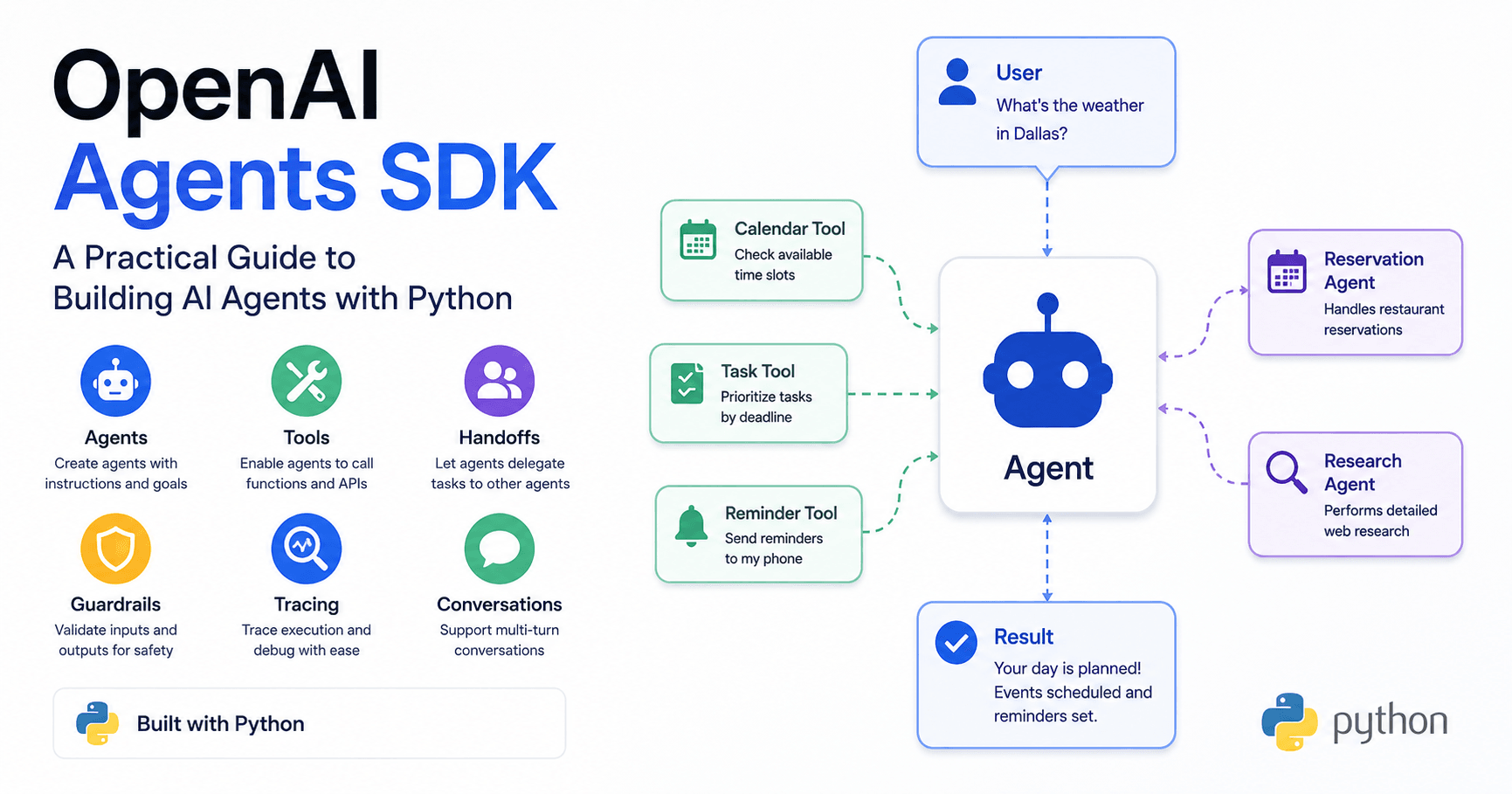

AI agents are becoming one of the most important topics in artificial intelligence. Many people say that 2025 is the year of agents, but what does that really mean?
In simple terms, an AI agent is a large language model with a clear task and access to tools it can use on its own. Instead of only answering a message like a normal chatbot, an agent can decide when to call a function, use an API, search the web, hand work to another agent, or continue a multi-step workflow.
The OpenAI Agents SDK makes this easier for developers. It is a Python framework designed to help you create agents, connect them with tools, organize multi-agent systems, add guardrails, trace executions, and build real applications.
What Is an AI Agent?
A traditional language model receives a message and gives back a response. An agent goes further. It has instructions, a specific goal, and tools that help it complete a task.
For example, you could create a daily planning agent. This agent could check your calendar, prioritize tasks based on deadlines, and send reminders to your phone. The important part is that the agent can decide by itself which tool to use and when to use it.
This makes agents useful for workflows that need more than a single answer. They can plan, act, check results, and keep working until the task is complete.
Why the OpenAI Agents SDK Matters
There are already many libraries for building agentic applications, but the OpenAI Agents SDK gives developers a simple way to build these systems in Python.
With it, you can create agents with a name, instructions, and a model. You can also add tools, structured outputs, handoffs, guardrails, tracing, streaming, context, and multi-turn conversations.
The SDK is useful because it handles many complex parts behind the scenes. Instead of manually writing all the logic for tool calling or handoffs, you can define the agents and let the framework manage the flow.
Setting Up the Environment
To start using the OpenAI Agents SDK, you need Python, a virtual environment, and a few dependencies.
A typical installation looks like this:
pip install openai-agents python-dotenvThe openai-agents package gives you access to the SDK, while python-dotenv helps load environment variables from a local .env file.
You also need an OpenAI API key. After creating one in the OpenAI platform, you can save it in a .env file:
OPENAI_API_KEY=your_api_key_hereThen, inside your Python project, load it with:
from dotenv import load_dotenv

load_dotenv()
This allows the OpenAI library to automatically use your API key when running agents.
Creating Your First Agent
Creating an agent is simple. You import the tools, define instructions, and run it with a user message.
from agents import Agent, Runner

agent = Agent(
    name="Basic Agent",
    instructions="You are a helpful assistant. Respond only in all caps."
)

result = await Runner.run(agent, "Hello, how are you?")
print(result.final_output)
In this example, the agent follows the instruction and responds in uppercase. You can also choose a specific model. A cheaper model can be useful during testing, while a stronger model may be better for production.
Structured Outputs
One powerful feature of the SDK is structured output. Normally, language models return plain text. But in real applications, you often need structured data, such as JSON or a Python object.
Using Pydantic models, you can define the exact format you expect from the agent. For example, a recipe agent could return a title, ingredients, cooking time, and number of servings.
Instead of asking the model to “please return JSON” and hoping it works, the SDK can enforce a specific output type. This makes the response easier to use directly inside your application.
Tool Calling
Tool calling is where agents become much more powerful.
A tool is usually a Python function that the agent can use when needed. For example:
from agents import function_tool

@function_tool
def get_weather(city: str) -> str:
    return f"The weather in {city} is sunny."
Then, you can give this tool to an agent:
weather_agent = Agent(
    name="Weather Agent",
    instructions="You are a local weather agent. Given a city, tell the weather.",
    tools=[get_weather]
)
Now, when the user asks about the weather in Dallas, the agent can decide to call the get_weather function and use the result in its response.
This means agents can interact with external data, APIs, databases, internal systems, and custom business logic.
Web Search and External Data
The SDK can also work with built-in tools such as web search. This allows an agent to access current information from the internet.
For example, you could build a news agent that searches for recent articles about a topic and summarizes the results. This is useful because language models do not always have current information unless they are connected to an external source.
Developers should also pay attention to cost. Built-in tools can have additional pricing, so for larger projects it may be worth comparing alternatives such as DuckDuckGo Search, Firecrawl, or custom scraping tools.
Handoffs Between Agents
Handoffs allow one agent to pass control to another agent.
Imagine you have one agent that creates a tutorial outline and another agent that writes the full tutorial. The outline agent can generate the structure, then hand it off to the tutorial agent to complete the content.
This makes it possible to build teams of specialized agents. A triage agent can decide whether a user’s question should go to a math tutor or a history tutor. A customer service agent can answer simple questions but escalate complex issues to a manager agent.
Each agent focuses on a specific responsibility, which usually leads to better results.
Tracing and Debugging
When agents start calling tools, handing work to other agents, and generating complex outputs, debugging becomes very important.
Tracing helps you see what happened during the execution. You can inspect which agent ran, what input it received, what tool it called, which handoff occurred, how many tokens were used, and what output was generated.
This is extremely useful for understanding and improving agent workflows. Instead of guessing what happened, you can see the full execution path.
Streaming Responses
Streaming allows the response to appear gradually, just like in ChatGPT. Instead of waiting for the full answer to finish, the user sees the text as it is generated.
This is useful for applications with a user interface, because it feels faster and more interactive. You can also listen for events such as tool calls, agent updates, and completed messages.
Guardrails
Guardrails help validate what goes into and comes out of an agent.
An input guardrail checks the user’s message before the main agent responds. For example, a study helper agent could detect if a student is trying to paste a direct homework question instead of asking for conceptual help.
An output guardrail checks the agent’s response before showing it to the user. For example, you could block certain words, unsafe content, or responses that do not match your application’s rules.
Guardrails can be simple functions or separate agents that evaluate the input or output. This helps keep applications safer, more focused, and less expensive to run.
Multi-Turn Conversations and Context
Real chat applications need conversation memory. The SDK allows you to keep track of conversation history and pass it back into the agent.
This becomes even more important in multi-agent systems. If a triage agent hands the user to a math tutor, future messages should continue with the math tutor instead of restarting from the triage agent every time.
Context also lets you pass data to tools, guardrails, and handoff functions. For example, you could pass a user profile with an ID, name, budget, or shopping cart. Tools can use that context to check a budget, add items to a cart, or complete a purchase.
Common Agentic Patterns
The transcript introduces several common patterns for building agent systems.
A deterministic flow is when you manually control the order of agents. For example, one agent creates an outline, another evaluates it, and a third writes the final content.
A routing pattern uses a triage agent to decide which specialized agent should handle the task.
Agents as tools allow one agent to call another agent like a function, then receive the result back instead of fully handing off control.
The LLM-as-a-judge pattern uses one model to evaluate or improve another model’s output. One agent can create an answer, while another reviews it and gives feedback until the result is good enough.
These patterns help developers design better workflows instead of randomly connecting agents together.
Building a Deep Research Tool
The final project in the tutorial series is a deep research tool. It combines many of the concepts covered earlier.
The tool starts with a user query. A query agent breaks it into multiple search queries. Then, a search process finds web pages for each query. A search agent scrapes and summarizes the content. A follow-up decision agent checks whether more research is needed. If yes, it generates new follow-up queries and repeats the process.
Finally, a synthesis agent combines all summaries into a structured markdown report with sections, a conclusion, and sources.
This project shows the real power of agent systems.







评论0
请登录后发表评论。