
Building a voice AI agent can seem simple at first. You write a prompt, give the agent instructions, connect a few tools, and let it talk to users.
But when an agent needs to handle many different tasks, one long prompt quickly becomes a problem.
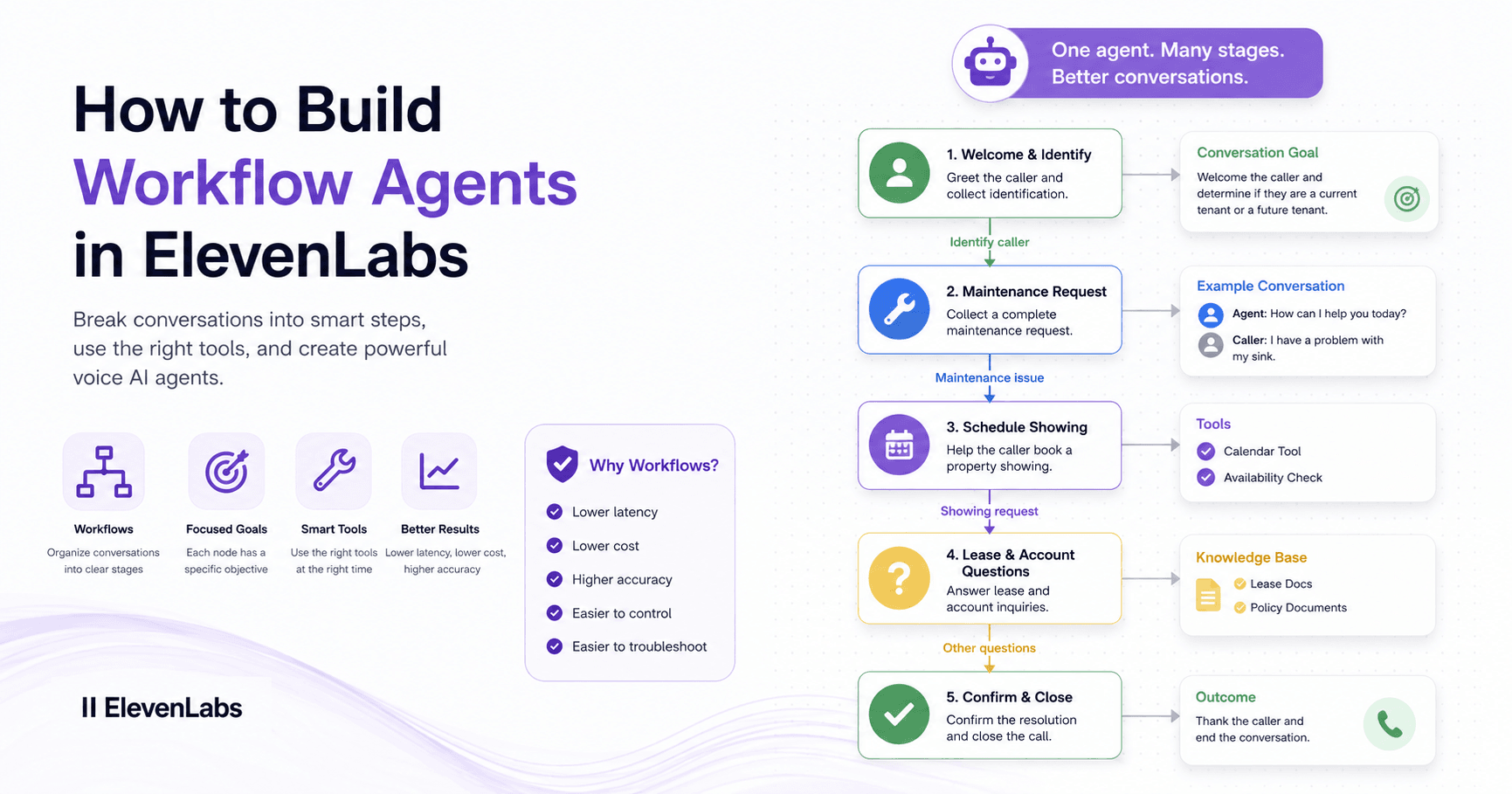
Imagine a property management voice agent. It may need to welcome callers, identify tenants, collect maintenance requests, answer lease questions, schedule property showings, and close the conversation properly.
If all of those instructions stay inside one huge prompt, the agent becomes slower, more expensive, and harder to control. Long prompts can increase latency, create confusion, and make the agent more likely to follow the wrong instruction.
That is why workflows are useful.
What Are Workflow Agents?
Workflow agents in ElevenLabs allow you to split a conversation into smaller stages called nodes.
Each node has one clear purpose.
For example, a property management workflow could include:
Welcome and identify caller
Maintenance request
Schedule showing
Lease and account questions
Confirm and close
The agent is still the same assistant, but each stage gives it a different focus. Instead of thinking about every possible task at once, the agent only receives the instructions it needs for the current part of the conversation.
This makes the agent faster, cleaner, and easier to troubleshoot.
Conversation Goals
Each node has a conversation goal.
This tells the agent what it should do during that specific part of the call.
For example, in a maintenance request node, the goal could be to collect the caller’s name, unit number, issue, urgency, and contact information.
This goal only becomes active when the caller is talking about maintenance. If the caller later asks about their lease, the workflow moves to a different node with different instructions.
This is a better way to manage context because the prompt stays focused.
Using Example Conversations
A good workflow node should include examples.
This is called multi-shot prompting. Instead of only telling the agent what to do, you show it what a good conversation looks like.
For example, you can include a sample conversation where a caller reports a broken sink and the agent asks for the correct details.
Examples help the agent understand tone, structure, and the right order of questions. They also make the conversation more predictable.
Edges and Transitions
Nodes are connected by edges.
Edges tell the agent when to move from one node to another.
For example, if the caller says they have a repair problem, the workflow should move from the welcome node to the maintenance request node.
A common transition type is an LLM condition. This means the AI decides when the caller’s message matches a condition.
Example:
Move to the maintenance node when the caller is a current tenant with a repair issue.
This keeps the conversation organized and prevents the agent from using the wrong instructions at the wrong time.
When to Use Workflows
Not every voice agent needs workflows.
For a simple FAQ assistant, one prompt may be enough.
But workflows are better when the agent needs to handle:
Appointment booking
Customer routing
Maintenance requests
Account questions
Tool calls
Call transfers
Different conversation paths
Error handling
The more complex the conversation becomes, the more important workflows are.
Node-Level Tools
One of the biggest advantages of workflows is that you can limit tools to specific nodes.
For example, a lease question node may need access to a tool that checks lease information. But the maintenance node does not need that tool.
By limiting tools, you reduce mistakes.
If every tool is available everywhere, the agent might call the wrong one. Keeping tools inside the right node makes the workflow safer and more reliable.
Router Nodes
A router node helps decide where the caller should go next.
For example, the welcome node can ask what the caller needs help with. Based on the answer, it routes them to maintenance, scheduling, lease questions, or another path.
Router nodes should have clear instructions and examples. This helps the agent understand each possible direction.
Backward Transitions
Real conversations do not always move in a straight line.
A caller may finish one task and then ask for something else.
For example, after a maintenance request, the agent may ask:
“Is there anything else I can help you with today?”
If the caller then asks a lease question, the workflow needs a way to move back to the correct node.
Backward transitions make this possible.
Override Prompt
Most nodes add their own instructions to the main system prompt. But sometimes a node needs to behave like a completely different agent.
That is when you can use override prompt.
Override prompt replaces the main prompt for that node. This is useful when the task is very different from the rest of the workflow.
For example, if the agent needs to handle a complex tax-related process, that node may need its own full instructions, tone, and examples.
Choosing the Right LLM
Each node can use a different language model.
Simple nodes can use faster models with lower latency. More complex nodes may need smarter models that follow instructions better and handle tools more accurately.
The goal is to balance speed and intelligence.
For voice AI, latency matters because users expect natural conversations. A slow response can make the agent feel less realistic.
Knowledge Bases and Tools
Workflows can also control knowledge bases.
A general agent may have one main knowledge base, but specific nodes can have their own documents.
For example:
An FAQ node can use FAQ documents.
A lease node can use lease documents.
A tax node can use tax documents.
This keeps answers more accurate and prevents the agent from using irrelevant information.
Tools work in a similar way. You can inherit tools from the main agent or add tools only to specific nodes.
Tool Nodes
There is a difference between a node-level tool and a tool node.
A node-level tool is available, but the agent decides whether to use it.
A tool node runs the tool automatically when the conversation reaches that stage.
This is useful when a tool must always run, such as booking an appointment after all required information has been collected.
You can also create paths for success and failure. If the booking works, the agent confirms it. If it fails, the agent can transfer the caller to a human.
Expression Transitions
LLM conditions are flexible, but sometimes you need stricter logic.
That is where expression transitions help.
Expression transitions use fixed rules instead of AI judgment.
They can route callers based on things like:
Call duration
Time of day
Customer status
Phone number recognition
CRM data
Dynamic variables
For example, if the caller is already recognized as a returning customer, the workflow can send them to a specific node automatically.
If the call lasts too long, the agent can transfer the caller to a human.
This makes workflows more predictable.
Testing Is Essential
Testing is one of the most important parts of building workflow agents.
AI is probabilistic, which means that just because something works once does not mean it will always work.
Each node and transition should be tested several times.
You should test:
Every main flow
Every transition
Every tool call
Every error path
Every common caller question
Every transfer scenario
A good practice is to test each important path at least 10 times.
Start with text testing because it is faster. After the logic works well, test with voice.
Final Thoughts
ElevenLabs workflows make voice agents more organized, reliable, and ready for real business use.
Instead of placing everything inside one long prompt, workflows divide the conversation into focused stages.
Each node has a purpose.
Each edge controls movement.
Each tool is available only where needed.
Each path can be tested and improved.
For simple agents, a single prompt may be enough. But for complex assistants that handle bookings, support, routing, tools, and transfers, workflows provide much better control.
The best way to think about a workflow is like a conversation map.
The clearer the map, the better the agent performs.







评论0
请登录后发表评论。