
Finding reliable research papers can take a lot of time, especially when you are working on a thesis, literature review, or academic project. Many researchers spend hours searching through different websites, opening papers one by one, and trying to decide which sources are actually useful.
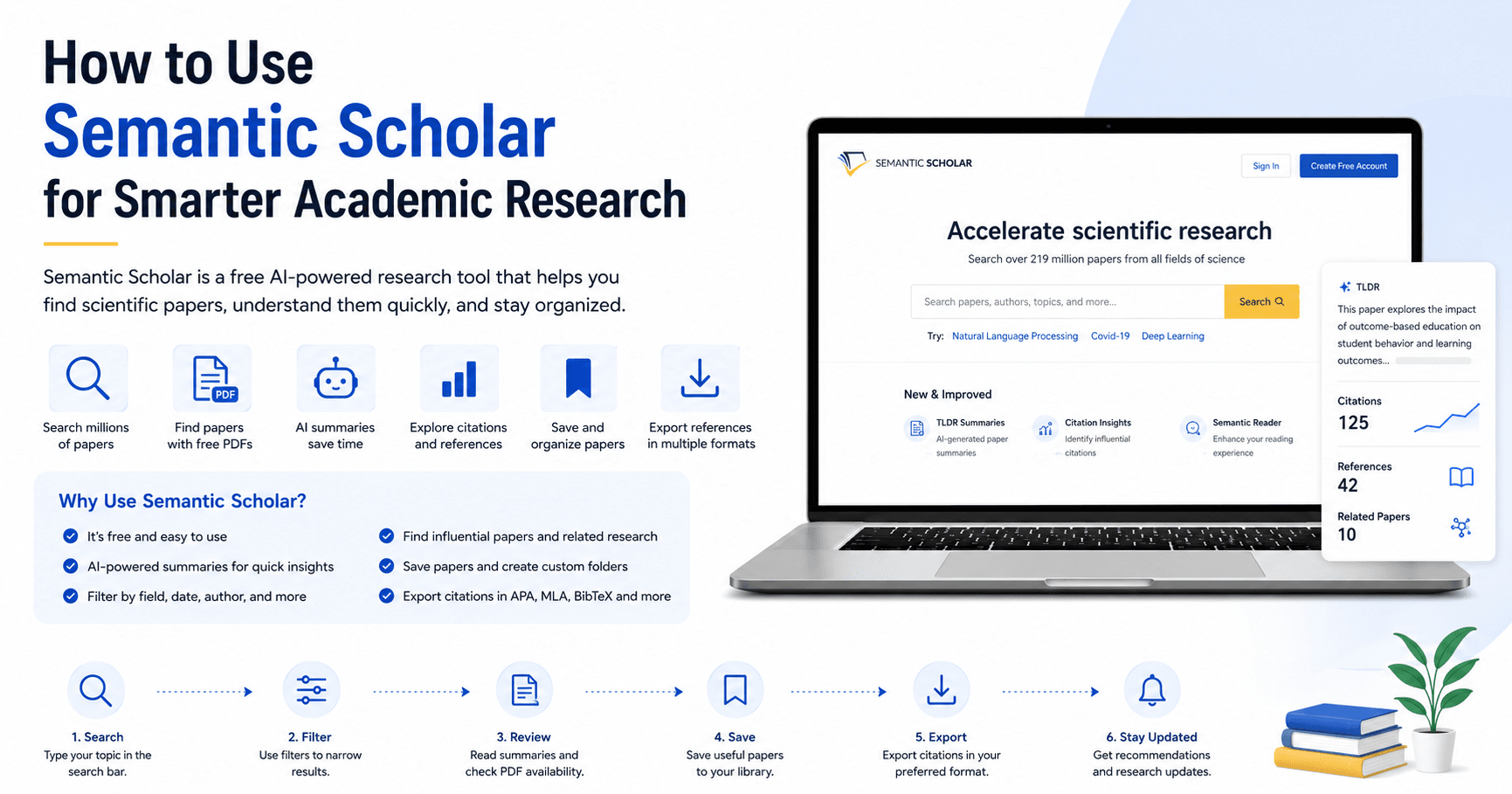
Semantic Scholar helps make this process easier. It is a free AI-powered research tool designed to help students, teachers, and researchers find scientific papers faster, understand them more quickly, and organize useful references in one place.
What Is Semantic Scholar?
Semantic Scholar is an academic search engine powered by artificial intelligence. It helps users search for research papers across different fields of study, including education, computer science, engineering, economics, business, and many other areas.
The platform can be accessed at SemanticScholar.org. One of its biggest advantages is that it is free to use. You do not need a paid subscription, and you can search for papers even without logging in.
However, creating an account gives you access to extra features. When you log in, you can save papers to your personal library, create folders, manage your own publications, receive recommendations, and make your research work more organized.
Searching for Research Papers
The main feature of Semantic Scholar is its search bar. You can type any topic related to your research and quickly receive a large list of academic papers.
For example, if you search for a topic like “OB” or “outcome-based education,” Semantic Scholar will show papers related to that subject. The results include paper titles, authors, publication dates, citations, PDF availability, and short summaries.
This is useful when you are doing literature work and need to collect many papers for reading, comparison, or reference building.
Filtering Results by Field of Study
One helpful feature is the ability to filter results by field of study. After searching for a topic, you can narrow the results based on specific areas such as education, computer science, business, engineering, economics, and more.
This makes the search more accurate. Instead of going through thousands or millions of unrelated results, you can focus only on the papers that match your academic field.
For example, if you are researching outcome-based education, selecting the education field can help you find papers that are more relevant to your work.
Finding Papers with Free PDFs
One of the most useful features in Semantic Scholar is the “Has PDF” filter.
When you activate this option, the platform shows papers that have a PDF available. This saves a lot of time because you do not need to open every result manually to check whether the full paper is accessible.
For students and researchers who do not have access to paid academic databases, this feature is especially valuable. It helps you find papers that can be read immediately and used for your research work.
Using AI Summaries to Save Time
Semantic Scholar also provides short AI-generated summaries for many papers. These summaries usually appear in two or three lines and give you a quick idea of what the paper is about.
This is helpful when you do not have time to read every abstract or full paper. By reading the short summary, you can quickly decide whether a paper is worth saving or reading in detail.
For literature reviews, this feature can speed up the first stage of research. Instead of opening dozens of papers blindly, you can scan the summaries and select the most relevant ones.
Sorting Papers by Date and Relevance
Semantic Scholar allows you to sort and filter papers in different ways. You can select a specific date range, such as the last five years, last ten years, or a custom period.
This is important because many research topics require recent studies. If you are writing about a current academic issue, you may want to focus on newer papers instead of older ones.
You can also filter by author, journal, or conference. This helps when you are looking for papers from a specific researcher or publication source.
Exploring Citations, References, and Related Papers
Another strong feature of Semantic Scholar is how it connects papers together.
When you open a paper, you can see how many citations it has, how many references it includes, and which related papers are connected to it.
The citations show other works that have cited the paper. The references show the sources used inside that paper. The related papers help you discover more studies on the same or similar topics.
This is very useful for building a strong literature review because it allows you to move from one paper to many connected papers. Instead of searching randomly, you can follow the academic network around your topic.
Saving Papers to Your Library
If you are working on a large project, you may need to collect 20, 30, or even more papers. Semantic Scholar makes this easier with the library feature.
When you find a useful paper, you can click “Save to Library.” You can also create folders for different topics or sections of your research.
For example, you can create a folder for “Outcome-Based Education” and save all related papers there. This keeps your research organized and makes it easier to return to important papers later.
Exporting References
Semantic Scholar also helps with citation management. After saving papers in your library, you can select them and export references in different formats, including BibTeX, MLA, APA, Chicago, and EndNote.
This is a very practical feature for academic writing. Instead of manually typing references, you can copy or export them and add them to your document.
For researchers writing papers, theses, or assignments, this can save a lot of time and reduce formatting mistakes.
Using Research Feeds and Recommendations
When you save papers or add your own publications, Semantic Scholar can recommend more papers related to your research interests.
This feature is called Research Feeds. It uses AI to understand the topics you are interested in and then suggests new papers that may be useful for your work.
This is helpful because research is always changing. New papers are published regularly, and it can be difficult to keep track of everything manually. With recommendations, you can discover relevant studies more easily.
Managing Your Author Profile
If you are a researcher with published papers, Semantic Scholar may already have an author profile for you. You can claim and edit your profile, add missing papers, remove incorrect ones, and manage your publication list.
The profile may show your number of publications, citations, h-index, co-authors, and recent citations.
This can help increase your visibility in the research world and make it easier for others to discover your academic work.
Using the Research Dashboard
The Research Dashboard combines information from your publications, saved papers, research fields, and recommendations.
It can show recent citations of your papers, recommended research papers, and useful updates related to your academic interests.
For active researchers, this dashboard can work like a personal research assistant. It helps you monitor impact, discover new work, and stay connected with your field.
Final Thoughts
Semantic Scholar is a powerful and practical tool for academic research. It helps users search for papers, find free PDFs, read AI-generated summaries, explore citations, save papers, export references, and receive personalized recommendations.
For students, it can make literature reviews faster and less stressful. For teachers, it can help with academic preparation and resource discovery. For researchers, it can support publication tracking, collaboration, and ongoing research updates.
If you are working on a thesis, research paper, or literature review, Semantic Scholar is worth using. It combines free access with AI-powered features, making academic discovery easier, faster, and more organized.







Комментарии0
Пожалуйста, войдите, чтобы оставить комментарий.