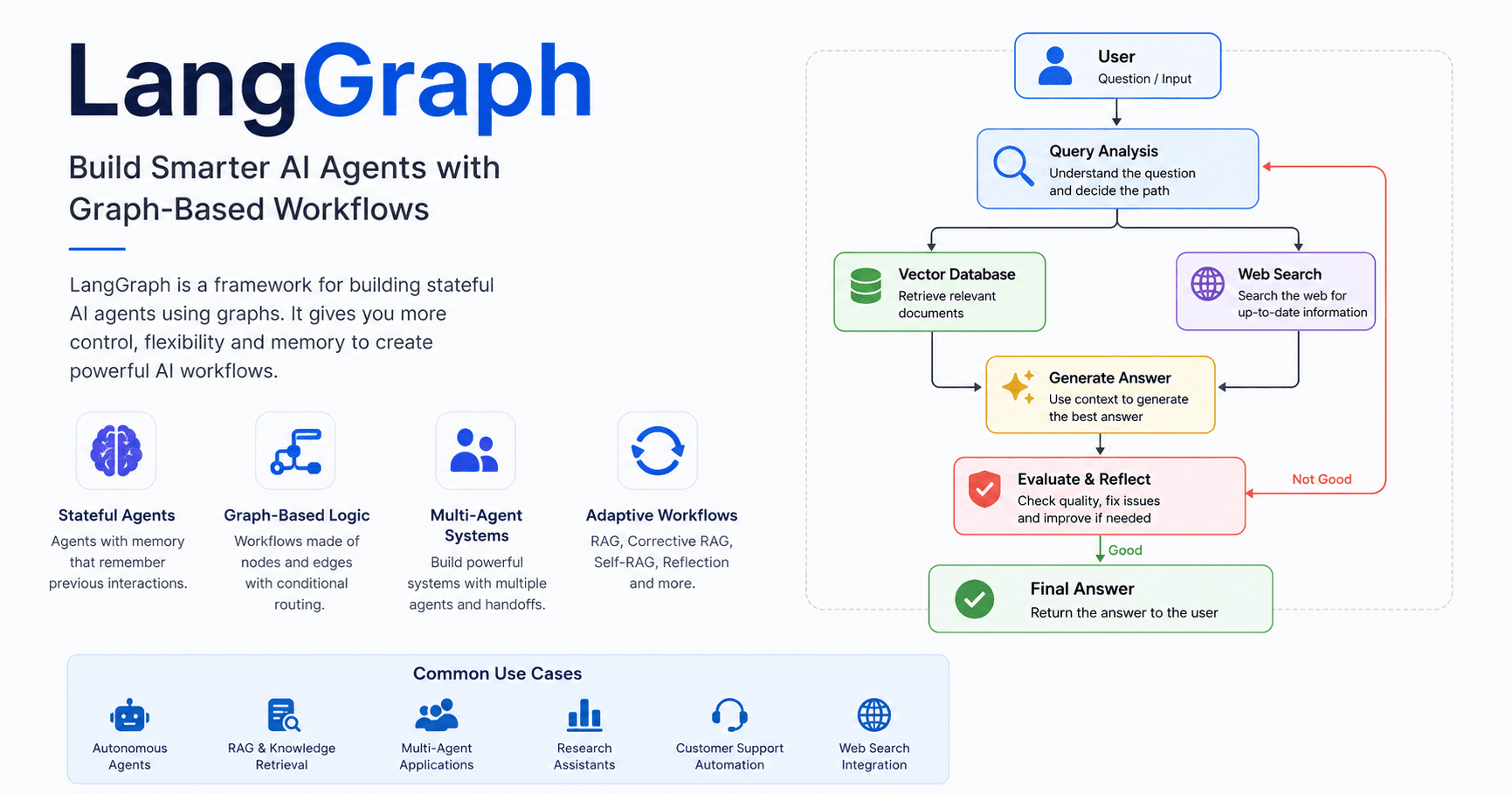

LangGraph is a framework for building advanced AI agents using graph-based logic. Instead of creating a simple linear flow, LangGraph lets developers design systems made of nodes, edges, conditions, memory, and multiple agents working together.
This makes it useful for creating stateful agents, RAG pipelines, self-correcting workflows, reflective systems, and multi-agent applications.
In simple terms, LangGraph gives more control over how an AI system thinks, moves between tasks, checks its own work, and decides what to do next.
What Is LangGraph?
LangGraph helps developers create AI agents using graphs. A graph is made of nodes and edges.
A node can be a function, an AI agent, a retriever, a generator, a classifier, or any other step in the workflow. An edge defines how the system moves from one node to another.
For example, a user may send a question to the system. That question goes to a main node. Then, based on the topic, a conditional edge can decide whether the question should go to a finance agent, a health agent, a web search tool, a vector database, or another specialized step.
This is what makes LangGraph powerful. The system does not need to follow the same path every time. It can choose the best route based on the user’s input and the current state.
Another important feature is memory. LangGraph can build agents that remember previous interactions, which is useful for assistants, automation tools, research systems, and customer support agents.
Why Use LangGraph?
LangChain is useful for building chains, tools, and basic agent workflows. But when the system becomes more complex, LangGraph offers more flexibility.
In a traditional multi-agent setup, the user usually talks only to the main agent. The main agent calls sub-agents, receives their results, and sends the final answer back to the user.
With LangGraph, the workflow can be more flexible. A sub-agent can handle part of the task, pass control to another agent, or interact more directly with the user. This makes it easier to build systems where multiple agents collaborate in a controlled way.
This is especially useful when one agent handles research, another summarizes, another validates information, and another generates the final response.
Building a First Graph
The first practical step in LangGraph is creating a basic graph.
A simple workflow can look like this:
Start → Node A → Node B → End
Each node can update the state of the graph. The state works like the memory of the workflow. It can store messages, generated queries, retrieved documents, user inputs, AI responses, and routing decisions.
This is important because LangGraph workflows are not just a sequence of function calls. They are structured processes where each step can read, update, and pass information forward.
Conditional Edges
One of the most important features of LangGraph is the conditional edge.
A conditional edge works like a router. It decides where the workflow should go next.
For example, after a node runs, the system can check the user’s request:
If the question is about health, send it to a health agent.
If it is about finance, send it to a finance agent.
If it is outside the system’s scope, end the workflow.
This allows developers to create smarter AI systems. Instead of forcing every request through the same path, the workflow can adapt to each situation.
Building a Q&A Workflow with RAG
One major example from the tutorial is building a question-answering system over documents using RAG.
RAG means Retrieval-Augmented Generation. It allows the system to retrieve relevant information from a knowledge base before generating an answer.
A LangGraph RAG workflow can work like this:
The user asks a question.
A query analysis node checks if the question is related to the available documents.
If the question is out of scope, the system returns a simple response.
If the question is valid, it goes to a query rewrite node.
The query rewrite node creates better versions of the user’s question.
The retriever searches the vector database.
The generate node creates the final answer using the retrieved documents.
This makes the answer more reliable because the AI uses real context instead of depending only on its internal knowledge.
Corrective RAG
Corrective RAG, also called CRAG, improves a normal RAG pipeline by adding an evaluation step.
In a basic RAG system, the AI retrieves documents and generates an answer. But sometimes the retrieved documents are not relevant. If the AI uses weak context, the final answer may be wrong or incomplete.
Corrective RAG solves this by adding a grader node.
After the retriever gets documents, the grader checks whether they are relevant to the user’s question.
If the documents are relevant, the workflow moves to the generate node.
If they are not relevant, the system rewrites the query and tries again.
To avoid an infinite loop, the workflow can set a limit, such as three attempts. After that, it can generate an answer with the available context or use a fallback, such as web search.
Corrective RAG with Web Search
The tutorial also shows how to improve Corrective RAG with a web search fallback.
This is useful when the vector database does not have the answer. If the retriever fails after several attempts, the workflow can route the question to a web search node.
The web search node collects fresh information from the internet. Then the system uses that information to generate a better answer.
This is useful for assistants that combine internal documents with external data.
Self-RAG
Self-RAG adds self-evaluation and self-reflection to the workflow.
In this type of system, the AI does not only retrieve and generate. It also checks whether the retrieved information is useful and whether the final answer contains hallucinations.
The workflow can work like this:
The user asks a question.
The system retrieves documents or searches the web.
It checks if the retrieved content is relevant.
It generates an answer.
A hallucination checker reviews the answer.
If the answer is grounded, it is returned to the user.
If the answer is weak or contains hallucinations, the system goes back, retrieves better information, and tries again.
This helps improve the quality and reliability of AI-generated answers.
Adaptive RAG
Adaptive RAG chooses the best path from the beginning.
In some workflows, the system tries the vector database first, fails, rewrites the query several times, and only then uses web search. This can waste time and resources.
Adaptive RAG solves this by adding a routing decision at the start.
If the user asks something related to internal documents, the system uses the vector database.
If the user asks for recent or trending information, the system goes directly to web search.
For example, “What is prompt engineering?” can go to the vector database. But “What are the latest AI trends?” should go directly to the web.
This makes the workflow faster and more efficient.
Reflection and Reflexion
LangGraph can also be used to build reflection workflows.
Reflection happens when the AI generates an answer, reviews it, creates criticism, and then improves the final version.
This is useful for essays, reports, articles, research answers, and any task where quality matters.
Reflexion goes one step further. The AI generates an initial answer, identifies missing information, creates search queries, collects new data, and improves the response using that data.
This makes the system more research-oriented and helps produce better answers.
Multi-Agent Systems with Handoff Pattern
The tutorial also explains how to build a multi-agent system using the handoff pattern.
In a traditional supervisor pattern, the main agent receives the user input, calls a sub-agent, gets the result, and then responds to the user.
In the handoff pattern, the main agent can delegate the task to a sub-agent, and that sub-agent can continue the workflow more directly.
For example, a system may have:
A manager agent.
A researcher agent.
A summarizer agent.
If the user says “hello,” the manager responds directly.
If the user asks for current information, the manager hands the task to the researcher. The researcher searches the web and passes the result to the summarizer. The summarizer then creates a clear final answer.
This makes the system more flexible because each agent has a specific role.
Final Thoughts
LangGraph is a powerful framework for building advanced AI agents and workflows. It helps developers move beyond simple chains and create systems that can make decisions, remember context, evaluate results, search the web, check for hallucinations, and work with multiple agents.
The main idea is simple: break the workflow into nodes, connect them with edges, store information in the state, and use conditions to decide what happens next.
With this structure, developers can build RAG systems, Corrective RAG pipelines, Self-RAG workflows, Adaptive RAG systems, reflection agents, and multi-agent applications.
For anyone who already understands the basics of LangChain and RAG, LangGraph is a strong next step. It gives more control, more flexibility, and a better structure for building real-world AI applications.







Комментарии0
Пожалуйста, войдите, чтобы оставить комментарий.