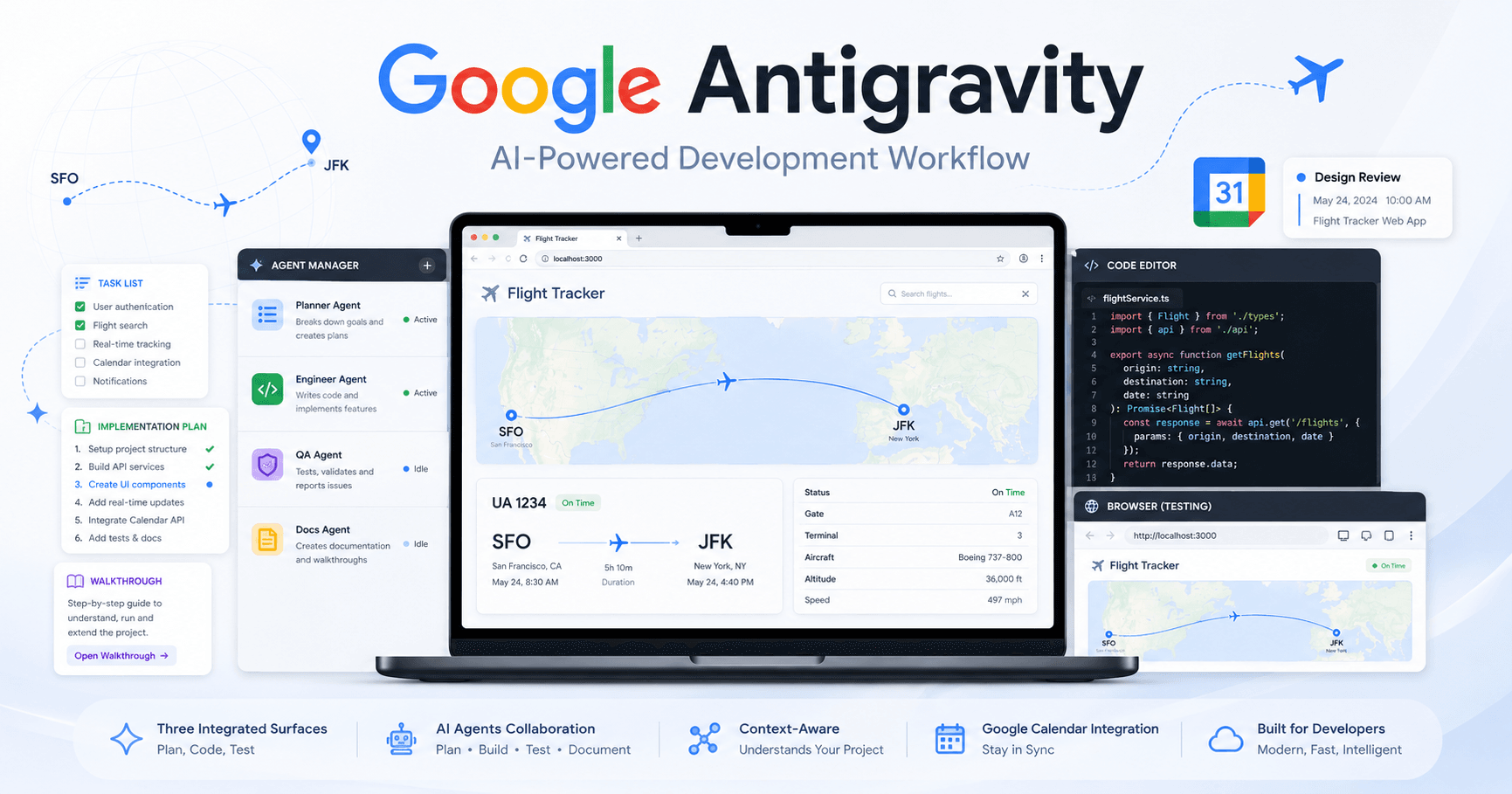

Google Antigravity is a new AI development environment created by Google DeepMind for developers who want to build applications faster with the help of intelligent agents. Instead of being only a code editor, Antigravity combines three important tools in one place: an editor, an agent manager, and a browser with AI control.
The idea is simple: you describe what you want to build, the AI agent plans the task, writes code, tests the result, and gives you a clear report of what was done. This creates a workflow where developers can focus more on reviewing, improving, and guiding the project instead of manually handling every small step.
Getting Started with Google Antigravity
When you first open Google Antigravity, the onboarding process helps you configure the environment. You can choose your visual theme, sign in with your Google account, and select how much autonomy you want to give to the AI agent.
One important option is agent-assisted development. In this mode, the agent can decide when a task is simple enough to complete on its own and when it needs your attention. For example, if the task is basic, the agent may run commands and generate code automatically. If the task is more complex, it can pause and ask you to review or approve a plan before making deeper changes.
This balance is one of the most useful parts of Antigravity. The agent can work independently, but the developer still stays in control.
The Three Main Surfaces of Antigravity
Google Antigravity is built around three main areas.
The first is the Agent Manager. This is where you can create, monitor, and manage agents across different workspaces. It works almost like an inbox for your AI development tasks. You can check progress, review completed work, and start new conversations with agents.
The second is the Editor. This is where you can directly work with the code. It includes familiar features like autocomplete, tab suggestions, and an agent sidebar. If the AI gets the project close to completion but you want to make final adjustments manually, you can jump into the editor and take over.
The third is the Browser. This is one of the most powerful parts of Antigravity. The browser allows the agent to interact with your app visually. It can click, scroll, fill forms, test features, and verify if the application is working correctly.
This makes the agent more useful because it does not only write code. It can also test the product like a real user.
Building a Flight Tracker App
In the example, the project starts with a simple request: build a Next.js web app where users can enter a flight number and see flight information such as start time, end time, time zones, departure location, and destination.
At first, the app uses a mock API that returns a list of matching flights. This is a smart way to begin because it allows the structure of the application to be created before connecting to real data.
After receiving the prompt, the Antigravity agent starts working. It can run commands like creating a new Next.js app, generate components, organize files, and prepare the initial interface. While this happens, the developer can follow the progress inside the task list.
Why Artifacts Are Important
One of the most interesting features in Google Antigravity is the use of artifacts. These are documents generated by the agent to explain and organize its work.
There are three main types of artifacts.
The first is the task list. It shows what the agent is currently doing and what steps are still pending.
The second is the implementation plan. This appears before the agent makes major changes. It explains what the agent plans to build, what files may be changed, and how it will verify the result.
The third is the walkthrough. This appears when the task is complete. It explains what was implemented and how the agent tested the feature. It may include screenshots, test results, browser actions, or terminal commands.
This makes the workflow more trustworthy. Instead of blindly accepting AI-generated code, you can review the reasoning, approve the plan, and confirm the final result.
Testing the App with the AI Browser
After the first version of the flight tracker is generated, Antigravity launches the app locally and opens the browser. The agent can then test the interface by itself.
In the example, it enters a flight number, checks valid and invalid states, and confirms that the search results appear correctly. The browser shows when the agent is in control, so the developer can watch the test happen in real time.
This is especially useful because testing is often one of the slowest parts of development. With Antigravity, the agent can verify the feature immediately after writing the code.
Working on Multiple Tasks at the Same Time
Another strong feature of Google Antigravity is parallel work. You can ask one agent to research an API while another agent works on design or UI improvements.
In the example, one task is created to research the AviationStack API and understand how to connect the app to live flight data. At the same time, another task asks the agent to design logo options for the app using Google’s image generation models.
This allows the developer to work in a more productive way. Instead of waiting for one task to finish before starting the next, the agent can handle multiple parts of the project in parallel.
Connecting the App to Live Flight Data
After the first version works with mock data, the next step is connecting the app to real flight information.
The agent researches the AviationStack API, reads the documentation, and even uses curl requests to test the response format. This helps it understand the exact data structure before writing the integration.
Then it creates a utility file to handle the API logic. The developer can review the file, open the editor, and replace the mock data with live API data. Because the agent already has context from the documentation and codebase, the editor can suggest changes automatically.
This makes the transition from mock data to real data much faster.
Adding Google Calendar Integration
The final feature is a Google Calendar integration. The goal is to make each flight card clickable so users can add the flight details directly to their calendar.
The developer asks the agent to add this feature and test it in the browser. The agent updates the app, maps the flight information into a calendar link, opens the browser, searches for a flight, clicks the result, and confirms that the Google Calendar event is generated correctly.
After that, the agent creates a walkthrough explaining what it changed and how it verified the result.
This shows how Antigravity can handle not only code generation but also complete feature implementation and testing.
Generating a Commit Message
When the feature is finished, Antigravity can also help with version control. The editor includes an option to generate a commit message based on the project changes and conversation history.
This is useful because the commit message is not generic. It understands the context of the work that was done, including the flight lookup app, live data integration, favicon update, and calendar feature.
Why Google Antigravity Matters
Google Antigravity represents a new style of software development. Instead of using AI only as a chatbot or autocomplete tool, developers can use agents that plan, code, test, and document their own work.
The biggest advantage is not that the AI replaces the developer. The real benefit is that it reduces repetitive work and gives developers more time to focus on decisions, architecture, quality, and final polish.
With features like agent management, implementation plans, browser testing, artifacts, and editor suggestions, Antigravity creates a more complete AI development workflow.
Final Thoughts
Google Antigravity is a powerful tool for developers who want to build applications faster with AI support. In the example, a complete flight tracker app was created from scratch, connected to live flight data, improved with a logo, tested in the browser, and integrated with Google Calendar.
The most important part of the workflow is control. The agent can do a lot of work automatically, but the developer can review plans, leave comments, inspect artifacts, edit the code, and approve the final result.
For anyone interested in AI-assisted development, Google Antigravity is worth watching closely. It shows how coding tools are evolving from simple editors into full AI-powered development environments.







Comentarios0
Inicia sesión para comentar.