
When we use AI for long tasks, the conversation usually starts simple and, little by little, becomes filled with files read, searches, tests, commands, and intermediate decisions.
The problem is that all of this takes up space in the main conversation context. The more information accumulates, the greater the chance the AI has of losing important details from the beginning or mixing different topics together.
This is where subagents come in.
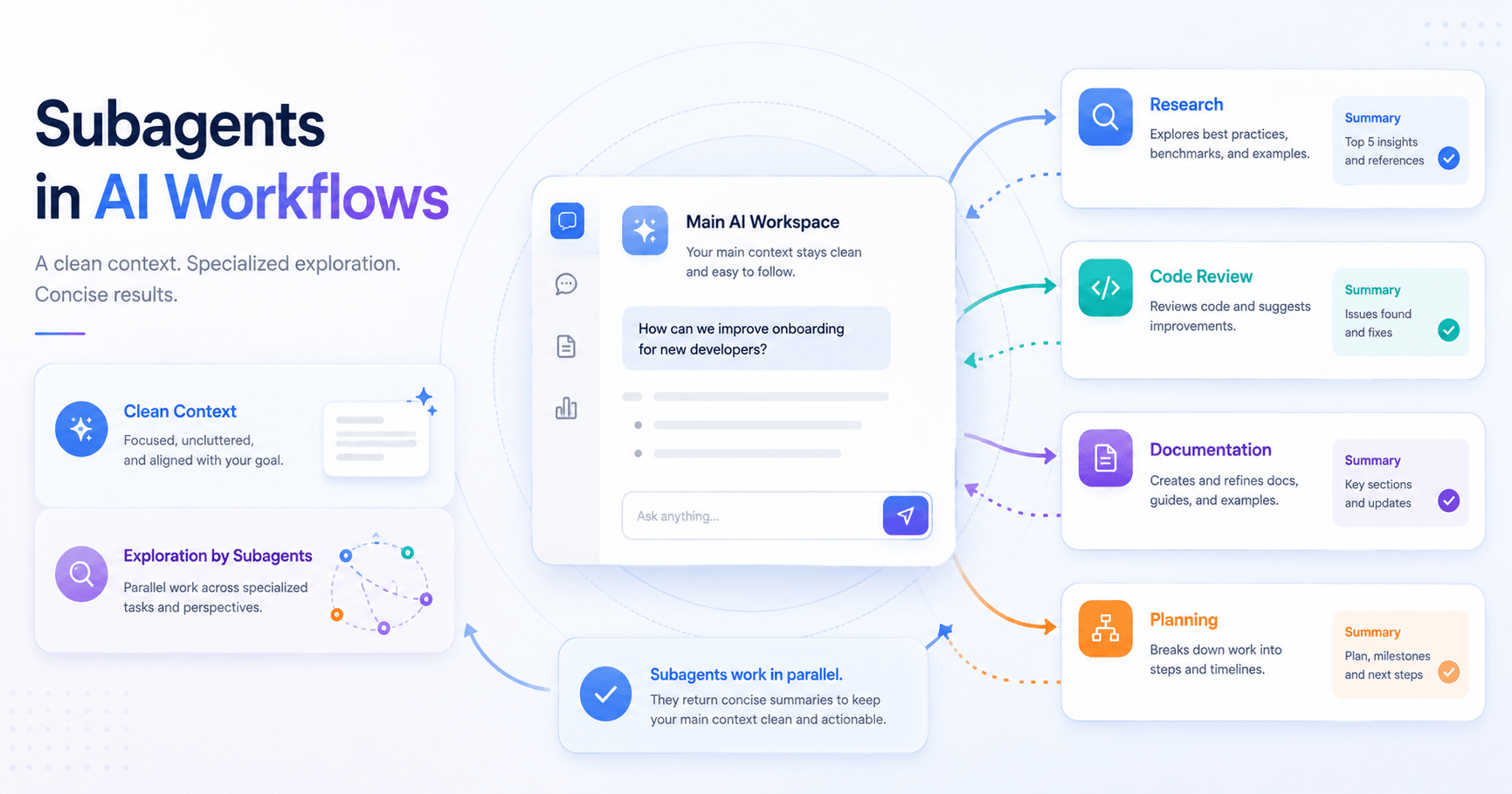
Subagents are specialized assistants that work on a specific task inside a separate context. Instead of placing the entire process inside the main conversation, the AI can delegate part of the work to a subagent, which researches, analyzes, performs the task, and then returns only a summary of what matters.
In practice, it is like having focused helpers for different roles.
One can review code.
Another can search files.
Another can write documentation.
Another can analyze security patterns.
Each one works separately and delivers a cleaner result back to the main conversation.
Why are subagents useful?
The biggest advantage of subagents is keeping the main context more organized.
Imagine you are analyzing a code project and want to find where authentication validation happens. Without a subagent, the AI may need to open several files, run multiple searches, and follow different function calls. All of that path stays recorded in the main conversation.
With a subagent, this exploration happens separately. It investigates, reads the necessary files, and returns something direct, such as:
“JWT validation happens in the middleware file, before the main routes.”
The user receives the answer, but the main conversation does not get cluttered with all the intermediate steps.
This helps especially in long sessions, where preserving context is essential to keep working clearly.
How do subagents work?
A subagent receives two main pieces of information.
The first is a custom instruction that defines its role. For example, it can be configured to act as a code reviewer, file researcher, or documentation generator.
The second is the task sent by the main agent. This task explains what needs to be done at that moment.
After that, the subagent works on its own. It can read files, search for information, analyze code, or run commands, depending on the permissions configured. When it finishes, it returns a summary to the main conversation.
The important detail is that the subagent’s internal process does not take up space in the main conversation. Only the conclusion comes back.
Practical examples
One of the most common uses is research in large codebases.
When you are entering a new project and want to understand which service handles payments, refunds, or authentication, a subagent can explore the files and bring back an objective answer.
Another good example is code review.
When the main AI helped create a feature, it may have difficulty reviewing its own work with a critical eye. A reviewer subagent comes in with a fresh perspective, analyzes the code separately, and points out problems related to security, performance, organization, or maintainability.
You can also create subagents for writing tasks. For example, a copywriting subagent can follow a specific tone for landing pages, emails, or posts. A documentation subagent can focus on clearly explaining functions, flows, and technical decisions.
Custom subagents
Besides ready-made subagents, you can also create custom subagents.
The idea is to define a configuration file with information such as name, description, allowed tools, model used, and behavior instructions.
A code review subagent, for example, can be configured to:
Analyze only modified files.
Check security risks.
Point out performance problems.
Suggest architecture improvements.
Say whether the code is ready to merge.
This customization makes the subagent more predictable. Instead of simply saying “be an expert,” you define exactly what it should observe and how it should deliver the result.
The secret is in the configuration
A well-configured subagent needs a clear description.
The description helps the main agent understand when it should use that subagent. If the description is vague, the agent may call the subagent at the wrong moment or pass a poorly explained task.
It is also important to define an output format.
For example, a review subagent can always respond with:
Analysis summary.
Critical issues.
Major issues.
Minor issues.
Recommendations.
Approval status.
Obstacles encountered.
This type of structure prevents loose answers and helps the subagent know when the task is complete.
Another important point is limiting access to tools.
A research subagent may only need to read files.
A code reviewer may need to run commands to see differences.
A styling agent may need to edit files.
Giving too many tools increases the risk of unnecessary actions. Giving only what is needed makes the work safer and more focused.
When should you use subagents?
Subagents work very well when you need the final result but do not need to follow every step that led to it.
They are ideal for:
Research in large projects.
File exploration.
Code reviews.
Tasks with specific criteria.
Work that requires a custom prompt.
The main point is to separate exploration from execution.
If the task requires a lot of investigation but you only need the conclusion, it is worth using a subagent.
When should you avoid subagents?
Subagents are not always the best choice.
They can get in the way when each step depends directly on the previous one. For example, in a workflow of fixing a bug, testing, adjusting, and testing again, it may be better to keep everything in the main conversation because the intermediate details matter.
It also does not make much sense to create subagents only with titles like “Python expert” or “Kubernetes expert.” The main AI already has that knowledge. A subagent needs to have a real function, a specific context, or a different way of working.
Another problematic case is using subagents only to run tests. When a test fails, you usually need to see the full error. If the subagent only returns a summary saying “it failed,” useful information may be lost.
The simple rule
Before using a subagent, ask one question:
“Does the intermediate work matter to the main conversation?”
If the answer is no, a subagent can help a lot.
If the answer is yes, it may be better to keep the task in the main conversation.
Subagents are useful because they make AI work more organized, focused, and scalable. They allow complex tasks to be divided into smaller parts without overloading the main context.
In the end, the goal is not to create multiple agents just for the sake of it.
The goal is to use specialized assistants when they truly improve the workflow.
When used well, subagents work like a support team inside the AI itself: each one has a clear role, the right tools, and an objective delivery. This makes long sessions more productive, reduces noise, and helps the AI continue working with greater precision.
References: https://www.anthropic.com/learn







Comentarios0
Inicia sesión para comentar.