
Many people use artificial intelligence by repeating the same instructions over and over.
Every time they need to review code, write a pull request description, create documentation, or follow a team standard, they explain the same process again.
This becomes repetitive and wastes time.
That is where Agent Skills come in.
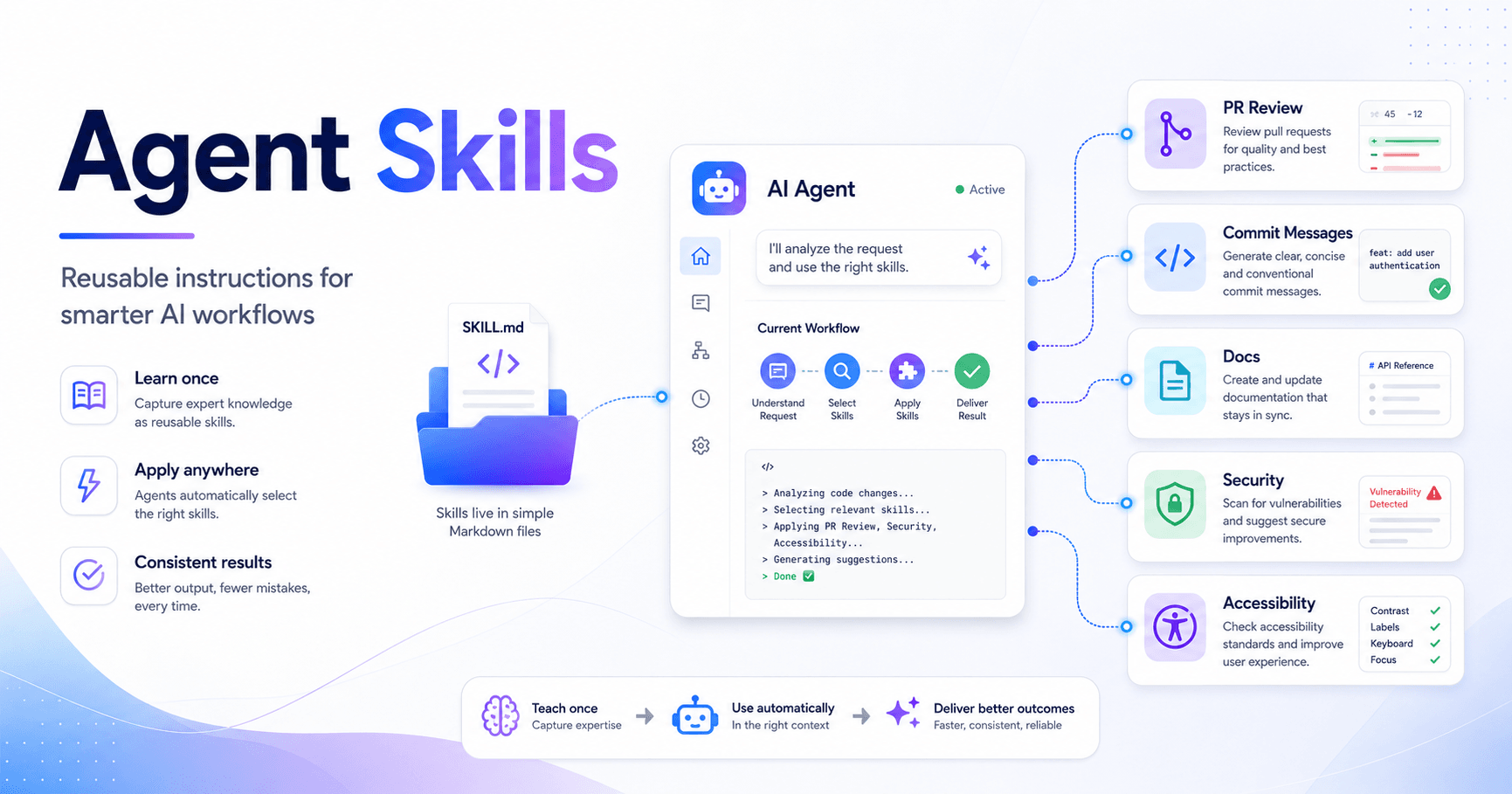
Agent Skills are reusable instructions that teach an AI agent how to perform specific tasks more consistently. Instead of explaining the same thing every time, you create a skill once, and the agent can use it whenever the task is relevant.
What are Agent Skills?
Agent Skills are instruction files that explain how an AI agent should handle a specific task.
A skill can teach AI to:
• review pull requests
• write commit messages
• follow documentation standards
• apply brand guidelines
• check accessibility
• review security issues
• create standardized technical summaries
The main idea is simple: if you keep giving the same instruction to AI, that instruction can probably become a skill.
In Claude Code, for example, each skill lives inside a folder and contains a file called SKILL.md. This file includes the skill name, description, and the instructions the agent should follow.
How does a skill work?
A skill usually has two main parts.
The first part is the metadata, also called frontmatter. It tells the agent the skill name and when it should be used.
Example:
---
name: pr-description
description: Writes pull request descriptions. Use when creating a PR or summarizing changes for a pull request.
---
The second part contains the instructions.
For example, a PR description skill could tell the agent to check the code changes and write the description in this format:
## What
One sentence explaining what this PR does.

## Why
Brief context on why this change is needed.

## Changes
- List the main changes
- Group related changes
- Mention deleted or renamed files
So when the user asks, “Create a description for this PR,” the agent can recognize the task, activate the skill, and follow the defined structure.
Why are Agent Skills useful?
The biggest benefit is consistency.
Without skills, every result depends on the prompt written at that moment. If the prompt is incomplete, the answer may be different from what you expected.
With skills, the agent follows a reusable process. This makes the output more predictable and aligned with your standards.
This is especially useful for teams.
Instead of each developer explaining the company’s review rules to the AI, the team can create one shared skill. Then, whenever someone asks for a review, the agent follows the same checklist.
Where are skills stored?
Skills can be personal or project-based.
Personal skills follow you across different projects. They are useful for individual preferences, such as your commit message style, documentation format, or preferred way of receiving explanations.
Project skills live inside the repository, usually in a folder like:
.claude/skillsThese are useful for team standards. Since they can be committed to version control, everyone who clones the project gets the same instructions.
This turns skills into a practical way to document workflows, standards, and expectations.
Skills are different from general instructions
Agent Skills are not the same as general project instructions.
A file like CLAUDE.md is better for rules that should always apply, such as project-wide standards, coding style, or restrictions.
Skills are better for specific tasks that only matter in certain situations.
For example:
Use CLAUDE.md for always-on rules.
Use Skills for task-specific expertise.
Use Slash commands when you want manual commands.
Use Hooks for event-based actions.
Use Subagents for delegated work in separate contexts.
Skills stand out because they are reusable, automatic, and activated based on the request.
How does the agent choose a skill?
The agent uses the skill description to decide when to activate it.
That is why the description is one of the most important parts.
A good description should explain:
What the skill does.
When the skill should be used.
A weak description would be:
description: Helps with code.This is too generic.
A better description would be:
description: Reviews frontend React components for accessibility, performance, and code quality. Use when checking UI code or improving frontend implementation.This makes the purpose clear and helps the agent choose the right skill.
Skills can have extra files
Simple skills can live only inside the SKILL.md file.
Larger skills can use extra files, such as references, templates, checklists, or scripts.
Example:
.claude/skills/frontend-review/
  SKILL.md
  references/accessibility-checklist.md
  references/performance-guide.md
  scripts/check-components.sh
This keeps the main file clean and easier to maintain.
The agent can load extra information only when needed, instead of filling the context with unnecessary details.
When should you create a skill?
You should create a skill when you notice that you are repeating the same instructions.
For example:
You always ask for the same response format.
You always explain the same commit standard.
You always use the same review checklist.
You always reinforce the same security or design rules.
You always ask AI to follow the same documentation structure.
A simple rule is:
If you have explained the same thing to AI three times, it may be time to turn it into a skill.
Practical example
Imagine your team works with Next.js, TypeScript, and Firebase.
You could create a skill called:
nextjs-firebase-reviewThis skill could tell the agent to:
• check TypeScript usage
• review component performance
• avoid unnecessary Firestore calls
• check security rules
• analyze hooks and state organization
• suggest improvements without changing the main structure
So when someone asks, “Review this admin dashboard component,” the agent can apply the right checklist automatically.
Agent Skills turn knowledge into process
One of the most powerful parts of Agent Skills is that they turn repeated knowledge into reusable process.
Many teams have good practices, but those practices are often spread across conversations, documents, or individual experience.
Skills help organize that knowledge.
They reduce repetition, improve consistency, and make AI more useful in real workflows.
Instead of only asking AI for answers, you teach it how your team works.
Conclusion
Agent Skills are a practical way to teach AI agents how to perform specific tasks with more consistency.
They help avoid repeated instructions, improve output quality, and make AI better aligned with your workflow.
The idea is simple: whenever you notice that you are giving the same instruction again and again, turn it into a skill.
This way, AI stops depending only on the prompt of the moment and starts working with clearer, reusable, and more reliable processes.
References: https://www.anthropic.com/learn







Comentarios0
Inicia sesión para comentar.