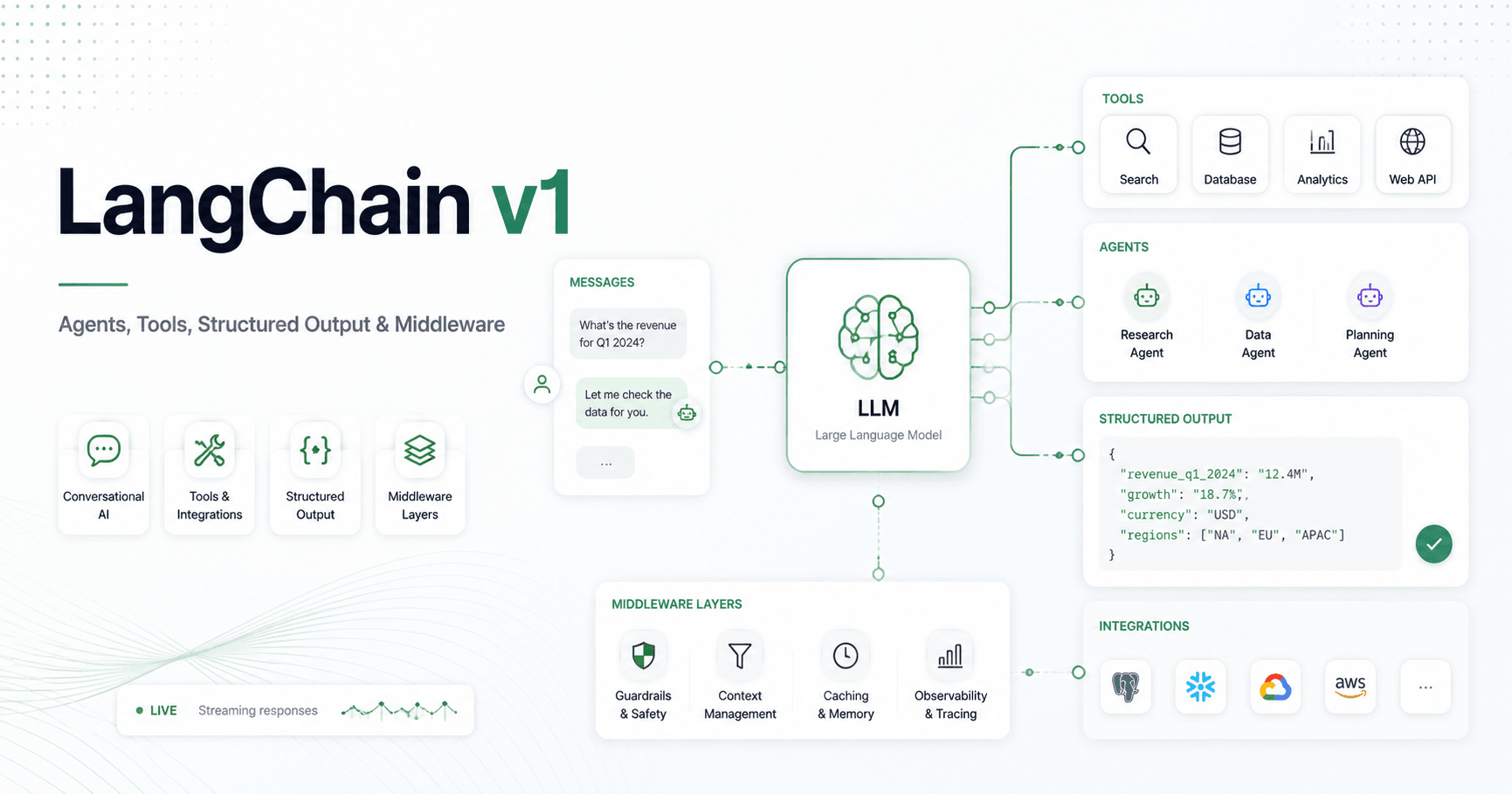

LangChain v1 brings a cleaner and more practical way to build AI applications that go beyond simple prompts. Instead of only sending a question to a language model and waiting for a text answer, developers can now create agents that use tools, connect to different AI models, return structured data, stream responses, and apply middleware for better control.
At its core, LangChain helps developers build AI systems that can reason, decide what to do next, and interact with external systems such as APIs, databases, search engines, or custom functions.
Why LangChain Matters
A normal language model is useful for answering questions, writing content, and summarizing information. But it has one big limitation: it does not automatically know live or current data.
For example, if you ask an LLM about today’s AI news or the current weather, it may not have the latest information. LangChain solves this by allowing the model to use tools. These tools can fetch updated data, search the web, call APIs, or run custom logic.
This turns a basic chatbot into a real AI agent.
Setting Up a LangChain Project
The tutorial starts by creating a clean Python environment using UV, a fast Python package and project manager written in Rust.
The basic setup includes creating a project with uv init, generating a virtual environment with uv venv, activating it, and installing the required LangChain libraries from a requirements file.
Common packages include LangChain, LangChain Community, LangChain OpenAI, LangChain Groq, LangChain Google GenAI, and Python dotenv. API keys for OpenAI, Google AI Studio, and Groq are stored inside a .env file so they can be loaded safely without hardcoding secrets in the code.
This setup gives the project access to multiple AI providers and keeps the development environment organized.
Agents in LangChain v1
The main concept in LangChain v1 is the agent.
An agent is an AI system that can decide when it needs help from a tool. If the user asks a simple question, the model may answer directly. But if the user asks something that requires live information, the agent can call a function, get the result, and then respond.
For example, a weather question can trigger a weather tool. The tool returns the weather data, and the agent uses that result to answer the user naturally.
In LangChain v1, agents are easier to create with create_agent. Developers can define the model, add tools, and include a system prompt that controls how the assistant should behave.
This makes agent development simpler than older approaches that required more manual setup.
Model Integration
LangChain also makes it easy to work with different AI model providers.
The tutorial shows how to connect OpenAI, Google Gemini, and Groq models. This is useful because different applications may need different models depending on cost, speed, quality, or specific capabilities.
One common method is using init_chat_model, which lets developers initialize different models with a similar interface. LangChain also supports provider-specific classes such as ChatOpenAI, ChatGoogleGenerativeAI, and ChatGroq.
This flexibility allows developers to switch models without rebuilding the entire application.
Streaming and Batch Processing
LangChain supports streaming responses, which improves the user experience in chatbots and long-form generation tools.
With a normal invoke call, the user waits until the full answer is generated. With streaming, the response appears gradually as the model creates it. This makes the application feel faster and more natural.
Batch processing is also useful. It allows multiple independent prompts to be sent to the model together, improving efficiency when the application needs to process several questions or tasks at once.
Tools in LangChain
Tools are functions that an agent can call.
A tool can search the web, access a database, call an API, send an email, calculate something, or run any custom logic. In LangChain, a function can become a tool by using the @tool decorator.
The tool description is important because it helps the model understand when to use it. For example, if a function has a description like “Get the weather for a location,” the model can identify that this tool should be used for weather-related questions.
Tools are what make agents practical. They allow the model to move from only generating text to actually performing useful actions.
Message Types
LangChain uses messages to structure conversations. The main message types are system messages, human messages, AI messages, and tool messages.
System messages define how the model should behave. Human messages represent user input. AI messages are the model’s responses. Tool messages contain the result of a tool call.
This structure is important for chatbots because a real conversation is not just one prompt. It is a sequence of instructions, user inputs, AI responses, and tool outputs.
A strong system message can make the model much more accurate. For example, telling the model that it is a senior Python developer will produce a more focused response than simply calling it a helpful assistant.
Structured Output
Structured output allows the model to return data in a predictable format instead of plain text.
This is useful when the output needs to be saved, displayed in an interface, validated, or passed to another process.
The tutorial shows three ways to define structured output: Pydantic, TypedDict, and data classes.
Pydantic is the most powerful option because it supports field validation, descriptions, and nested structures. TypedDict is simpler and useful when strict validation is not required. Data classes provide a clean Python-native way to organize data.
For example, instead of asking the model for random movie details, developers can ask it to return a title, year, director, and rating in a fixed schema.
Middleware
Middleware is one of the most important updates in LangChain v1.
It gives developers more control over what happens inside an agent. Middleware can be used for logging, debugging, retries, fallbacks, rate limits, guardrails, summarization, and human approval.
One useful example is summarization middleware. In long conversations, the message history can grow too large. Summarization middleware automatically compresses older messages while keeping recent context, helping the chatbot continue without using too many tokens.
Another important example is human-in-the-loop middleware. This pauses an agent before a sensitive action, such as sending an email or making a financial decision. A human can approve, edit, or reject the action before it runs.
This makes AI agents safer for real-world workflows.
Final Thoughts
LangChain v1 makes it easier to build modern AI applications with agents, tools, model integrations, streaming, structured output, and middleware.
The biggest advantage is that it helps developers move beyond basic chatbot behavior. With LangChain, an AI application can make decisions, call tools, manage context, return structured data, and safely interact with external systems.
For anyone building AI products, LangChain v1 is a strong foundation for creating smarter, more useful, and more reliable AI agents.







Comentários0
Faça login para comentar.