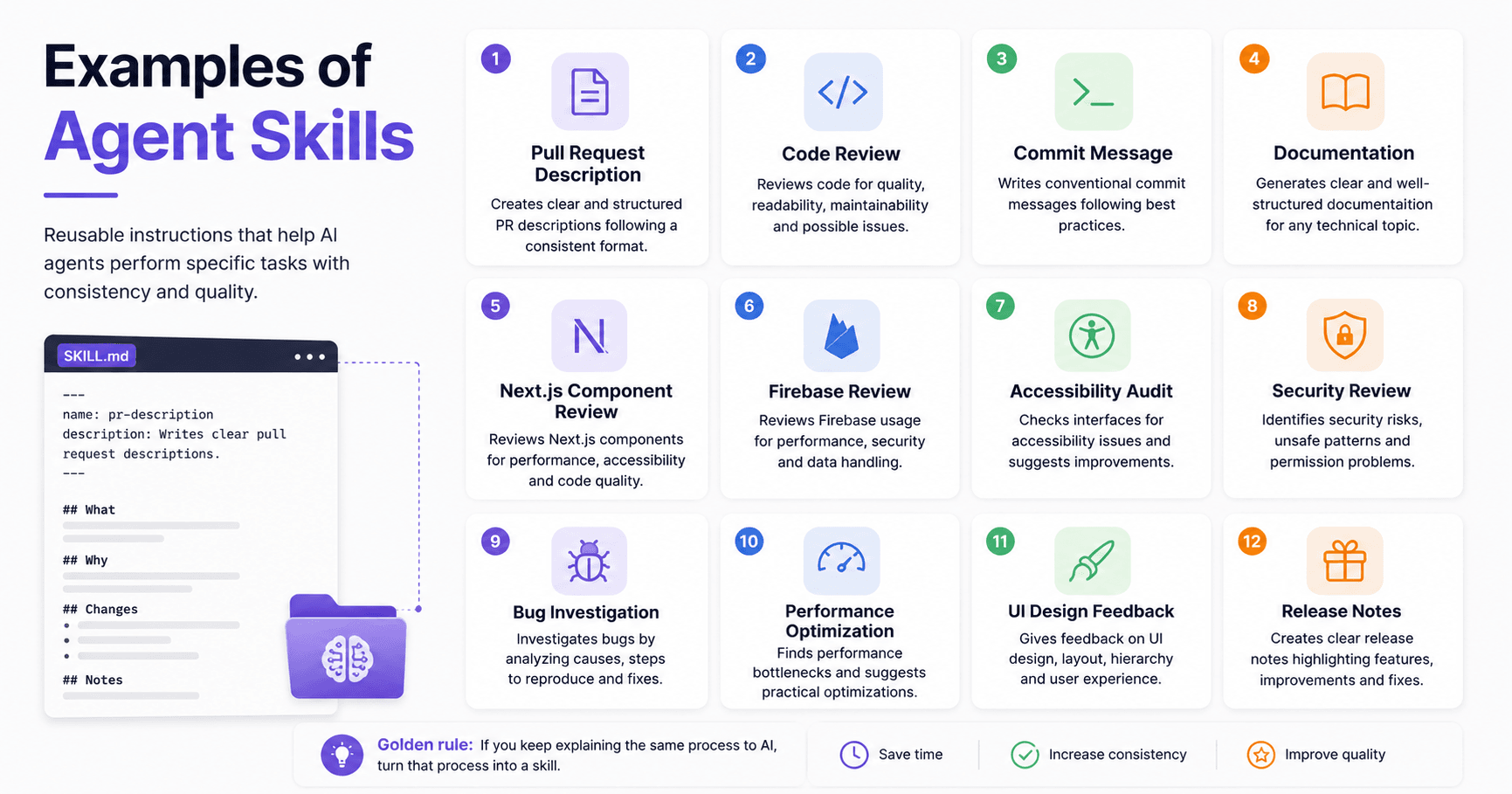

Agent Skills are easier to understand with real examples.
A skill is a reusable instruction that teaches an AI agent how to handle a specific task. Instead of explaining the same workflow every time, you create the skill once and let the agent apply it when needed.
Below are practical examples for development, documentation, security, design, and team workflows.
1. Pull Request Description Skill
---
name: pr-description
description: Writes clear pull request descriptions. Use when creating a PR or summarizing code changes.
---

When writing a pull request description:

1. Check the changes in the current branch.
2. Summarize the purpose of the PR.
3. Explain why the change was needed.
4. List the main changes.
5. Mention risks, migrations, or removed files.

Use this format:

## What
Explain what this PR does.

## Why
Explain why this change is needed.

## Changes
- List the main changes
- Group related updates
- Mention deleted or renamed files

## Notes
Mention anything reviewers should check.
This keeps PR descriptions consistent across the team.
2. Code Review Skill
---
name: code-review
description: Reviews code for quality, readability, maintainability, and possible bugs.
---

When reviewing code:

1. Check if the code solves the problem clearly.
2. Look for unnecessary complexity.
3. Identify bugs or edge cases.
4. Check naming and readability.
5. Separate critical issues from suggestions.

Use this format:

## Summary
Briefly explain the code quality.

## Critical Issues
List bugs, security risks, or breaking problems.

## Suggestions
List improvements.

## Positive Points
Mention what was done well.
This makes feedback clearer and more useful.
3. Commit Message Skill
---
name: commit-message
description: Writes conventional commit messages based on code changes.
---

When writing a commit message:

1. Analyze the change.
2. Choose the correct type.
3. Keep the message short.
4. Avoid generic messages like "update code".

Allowed types:

- feat: new features
- fix: bug fixes
- refactor: code changes without behavior changes
- docs: documentation
- test: tests
- chore: maintenance

Examples:

feat: add product search filter

fix: correct image upload validation

refactor: simplify product card rendering
This makes commit history easier to understand.
4. Documentation Skill
---
name: documentation-writer
description: Creates clear technical documentation for features, APIs, components, or processes.
---

When writing documentation:

1. Start with a simple explanation.
2. Explain what the feature does.
3. Explain when to use it.
4. Add step-by-step instructions.
5. Include examples when useful.

Use this format:

# Title

## Overview
Explain the topic simply.

## When to use
Describe where this is useful.

## How it works
Explain the process.

## Example
Show a practical example.

## Notes
Add important details.
This helps teams avoid confusing documentation.
5. Next.js Component Review Skill
---
name: nextjs-component-review
description: Reviews Next.js and React components for performance, readability, accessibility, and TypeScript quality.
---

When reviewing a Next.js component:

1. Check if the component is easy to understand.
2. Verify TypeScript types.
3. Look for unnecessary re-renders.
4. Check props organization.
5. Review Tailwind classes.
6. Check accessibility.

Focus on:

- Component structure
- State management
- Props typing
- Performance
- Reusability
- Mobile responsiveness
This is useful for dashboards, catalogs, landing pages, and SaaS interfaces.
6. Firebase Review Skill
---
name: firebase-review
description: Reviews Firebase, Firestore, and Storage usage for performance, security, and code quality.
---

When reviewing Firebase code:

1. Check if reads and writes are necessary.
2. Look for repeated or expensive queries.
3. Verify if listeners are cleaned up.
4. Check loading and error states.
5. Review upload logic.
6. Look for security rule concerns.

Pay attention to:

- onSnapshot usage
- query structure
- document IDs
- error handling
- Storage uploads
- permission risks
This helps avoid slow, expensive, or unsafe Firebase implementations.
7. Accessibility Audit Skill
---
name: accessibility-audit
description: Reviews user interfaces for accessibility issues.
---

When auditing accessibility:

1. Check button and link labels.
2. Verify keyboard navigation.
3. Check color contrast.
4. Review form labels and errors.
5. Check image alt text.

Use this format:

## Accessibility Issues
List problems that may affect users.

## Improvements
Suggest clear changes.

## Priority
Mark each issue as high, medium, or low.
This helps create interfaces that more people can use.
8. Security Review Skill
---
name: security-review
description: Reviews code for security risks, unsafe patterns, exposed secrets, and permission problems.
---

When reviewing security:

1. Check for exposed keys or secrets.
2. Look for unsafe user input handling.
3. Check authentication and authorization.
4. Review database access.
5. Identify risky uploads.
6. Check if sensitive data is exposed.

Use this format:

## Security Risks
List possible risks.

## Impact
Explain what could happen.

## Recommendation
Explain how to fix it.
This is useful before merging code or releasing features.
9. Bug Investigation Skill
---
name: bug-investigation
description: Investigates bugs by analyzing symptoms, causes, reproduction steps, and likely fixes.
---

When investigating a bug:

1. Identify the expected behavior.
2. Identify the actual behavior.
3. Define reproduction steps.
4. Find the likely cause.
5. Suggest a focused fix.
6. Avoid unrelated changes.

Use this format:

## Problem
Explain the issue.

## Likely Cause
Describe the probable reason.

## How to Confirm
Explain how to test it.

## Suggested Fix
Give the direct solution.
This keeps debugging focused.
10. Performance Optimization Skill
---
name: performance-optimization
description: Reviews code and user flows to find performance problems and suggest improvements.
---

When reviewing performance:

1. Look for unnecessary re-renders.
2. Check large components.
3. Review image loading.
4. Check expensive database calls.
5. Look for repeated calculations.
6. Suggest simple optimizations first.

Use this format:

## Performance Problems
List what may be slow.

## Recommended Improvements
Suggest practical changes.

## Expected Result
Explain what should improve.
This is useful when a project feels slow, especially on mobile.
11. UI Design Feedback Skill
---
name: ui-design-feedback
description: Reviews UI design for clarity, spacing, hierarchy, responsiveness, and user experience.
---

When reviewing UI design:

1. Check visual hierarchy.
2. Review spacing and alignment.
3. Check if the interface feels clean.
4. Analyze mobile responsiveness.
5. Identify confusing elements.
6. Suggest simple improvements.

Focus on:

- Layout
- Typography
- Spacing
- Contrast
- Buttons
- Cards
- Mobile experience
This helps keep interfaces polished and professional.
12. Release Notes Skill
---
name: release-notes
description: Writes clear release notes from product updates, bug fixes, and improvements.
---

When writing release notes:

1. Group changes by category.
2. Use simple language.
3. Focus on user impact.
4. Avoid overly technical explanations.
5. Mention breaking changes clearly.

Use this format:

## New Features
- List new features

## Improvements
- List improvements

## Bug Fixes
- List fixed issues

## Important Notes
- Mention migrations or breaking changes
This turns technical changes into content users can understand.
Conclusion
Agent Skills turn repeated instructions into reusable workflows.
You can create skills for code review, commits, documentation, security, accessibility, performance, design, debugging, and release notes.
The best skills are clear, specific, and focused on one type of task.
If you keep explaining the same process to AI, turn that process into a skill.
References: https://www.anthropic.com/learn







Komentar0
Silakan masuk untuk meninggalkan komentar.